You joined a group. You can see names. Now what?
The dashboard is the answer. Open it and immediately you know: the group average is 66%, KeenMolar has 3,225 questions under their belt, and that yellow band across Pharmacology Hard means everyone — not just you — is getting wrecked there. Five seconds of looking at this page tells you more about where you stand than a week of solo studying ever could.
The Knowledge Map
The first thing you see when you open a group is the Knowledge Map — a heatmap that plots every subject against every difficulty level, with accuracy percentages filling each cell.
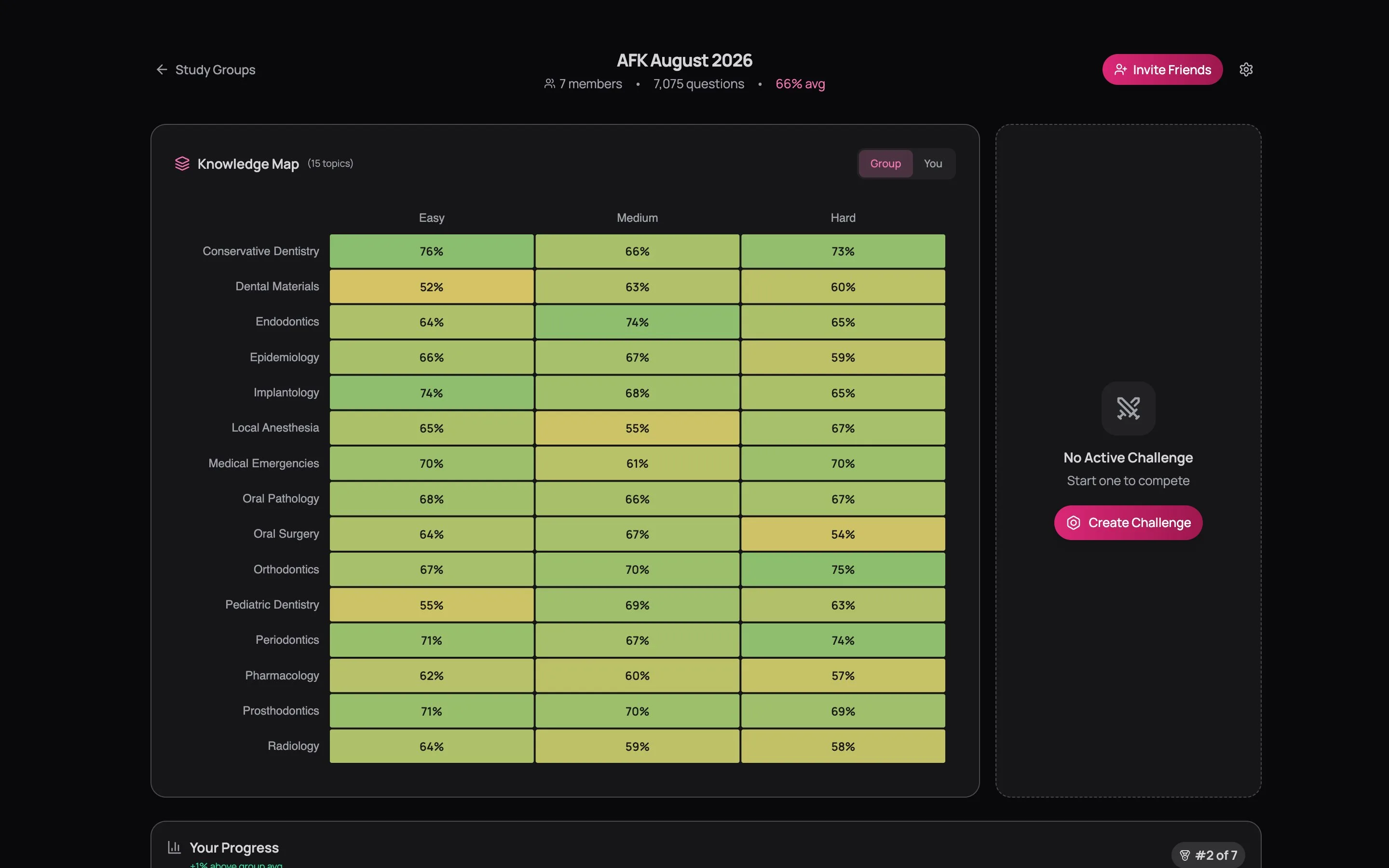
Each row is a subject. Each column is a difficulty tier — Easy, Medium, Hard. The cells are colour-coded: green means high accuracy, yellow means middling, red means the group (or you) is struggling there.
What It Actually Tells You
Look for the red cells. If Pharmacology Hard shows 57% while most other subjects are in the high 60s or 70s, that's not a surprise — Pharmacology Hard is brutal for everyone. But if Dental Materials Easy shows 52% while every other Easy column is above 65%, something is off. The group hasn't studied that material properly, and neither have you.
The Group / You toggle in the top right switches the heatmap between the group's aggregate data and your personal data. Toggle to "You" and suddenly the picture changes. Maybe the group is green across Orthodontics, but your row is yellow. That's your gap, clearly visible, impossible to ignore.
Toggle between Group and You every week. Where you're greener than the group, you're ahead. Where you're redder, you're behind. This comparison is more useful than any absolute score — it tells you where you stand relative to people taking the same exam.
Your Progress
Below the Knowledge Map, you get the numbers that answer the question you're really asking: am I keeping up?

Five cards: Questions answered (with the group total underneath for comparison), Accuracy (highlighted green when you're beating the group average), Quizzes completed, Streak, and Weekly Goal — a progress bar toward the group's shared question target.
Your rank sits on the right. "#2 of 7" means you're second by total questions answered. Above the group average? You'll see "+1% above group avg" in green. Below? It says so in amber. No hiding.
The Leaderboard
The leaderboard is the centrepiece of the group — a table showing every member ranked by activity.
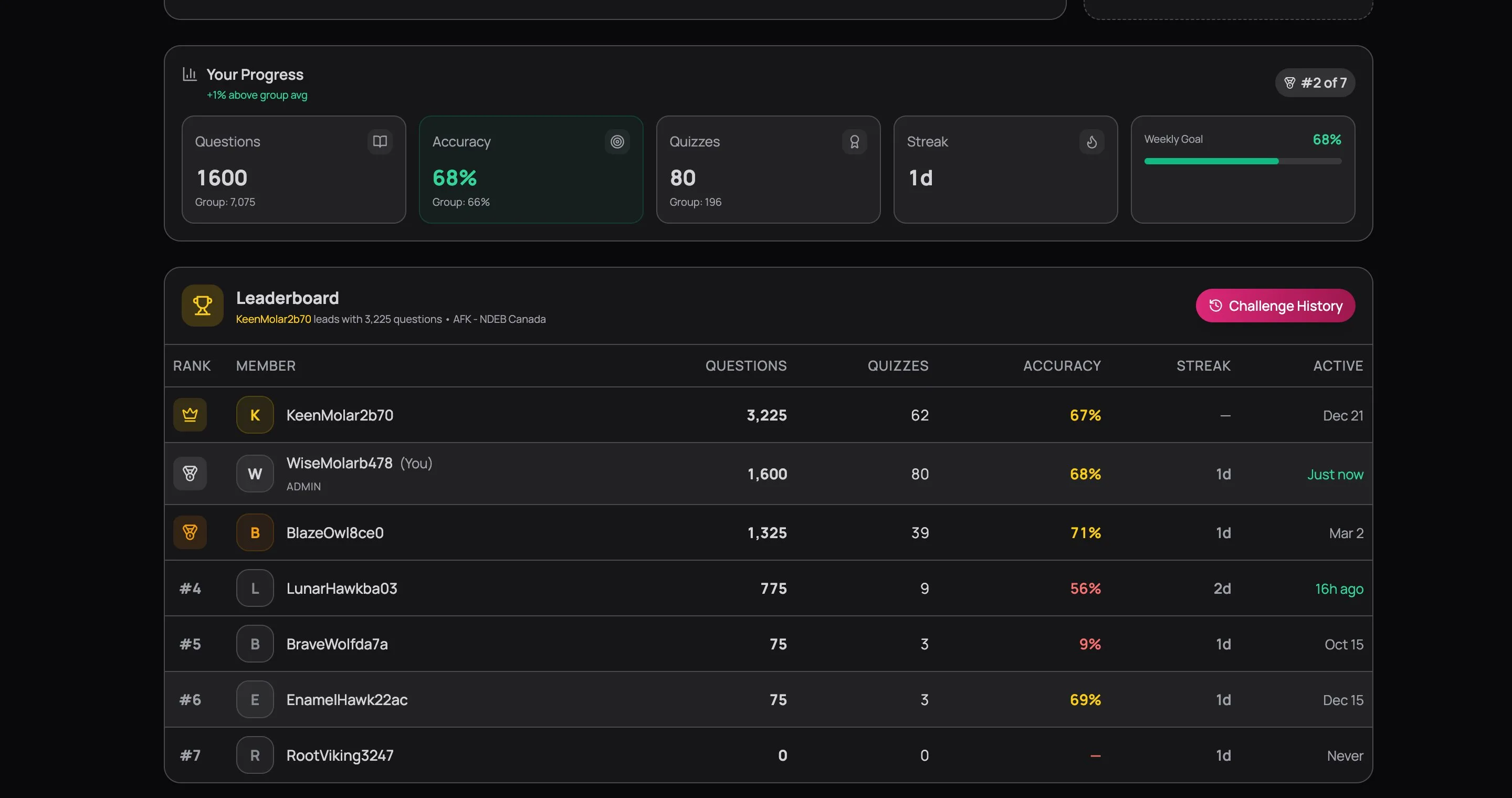
Each row shows: rank, display name, total questions answered, quizzes completed, accuracy percentage, current streak, and when they were last active. Your row is highlighted so you can find yourself instantly.
Reading the Leaderboard
The person with the most questions isn't necessarily the best prepared. Look at the full picture:
- High volume, low accuracy — grinding without reviewing. They're taking quizzes but not learning from mistakes. If this is you, slow down and spend time in Study Mode.
- High accuracy, low volume — accurate but cautious. Maybe only taking easy quizzes, or not doing enough to build endurance. Board exams are marathons, not sprints.
- Consistent streak, moderate everything else — this is often the person who'll be most prepared on exam day. Consistency beats intensity.
- "Never" in the Active column — they joined and vanished. Every group has one. Don't be that person.
The Competitive Edge
"I need to study more" is abstract. "I need to beat BlazeOwl's accuracy this week" is concrete. The leaderboard turns vague motivation into specific targets. You don't need to be #1 — you just need to not drop. That's enough to keep you showing up.
Challenges
Challenges are timed group competitions. An admin creates one, everyone attempts the same set of questions, and when the clock runs out, there's a winner.
Creating a Challenge
This is where admins (paid users) turn "we should all study Pharmacology this week" into something that actually happens.
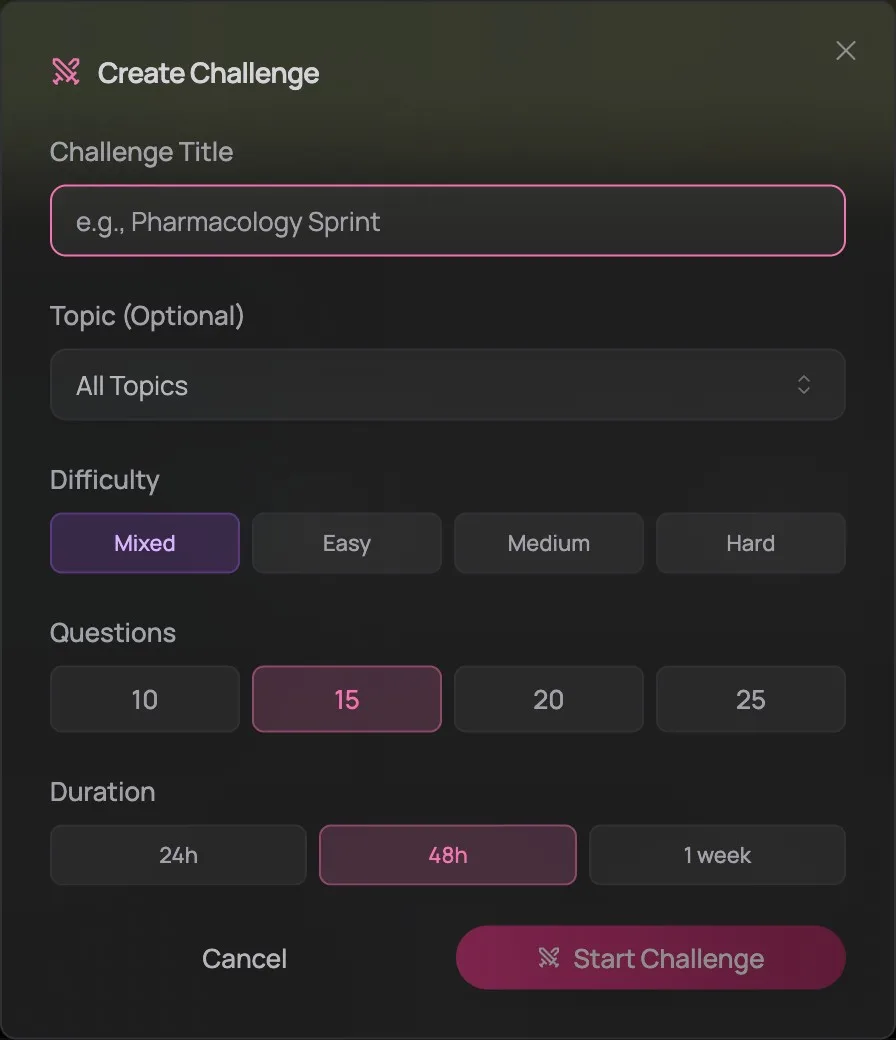
Give it a name with personality — "Friday Night Pharm" hits different than "Challenge 3." Pick a topic or leave it on All Topics for a mixed bag. Choose your difficulty, question count (10–25), and a deadline: 24 hours for a sprint, 48 hours for a weekend push, one week for a slow burn. Questions are pulled randomly from the bank, so nobody gets an advance preview.
Each group can only have one active challenge at a time. When it ends (or the timer runs out), the admin can create a new one. This keeps the group focused on one shared goal rather than scattered across multiple.
Taking a Challenge
When a challenge is live, you'll see it on the group dashboard with a countdown timer and a participation bar showing how many members have attempted it. Click "Take Challenge" and you enter a quiz interface — same question format as your regular quizzes, but with a live leaderboard tracking everyone's scores as they finish.
After you submit, you see your score, your rank, and the full leaderboard. Click through to review every question with explanations — this is where the learning happens, not during the challenge itself.
Challenge History
Every past challenge is saved — who won, what the scores were, and the full question set with explanations. Click "Challenge History" on the leaderboard card to revisit any previous challenge. Useful when you want to re-study a topic that destroyed you three weeks ago.
Reading Between the Lines
The leaderboard shows you raw numbers. The Knowledge Map shows you patterns. But the real insight comes from combining the two.
If BlazeOwl is #3 on the leaderboard with 71% accuracy while you're #2 with 68%, that's not just a ranking — they're answering fewer questions but getting more right. They're probably reviewing more carefully. If the group heatmap shows everyone below 60% in Biostatistics, that's not your personal weakness — it's the subject. That's a challenge waiting to happen.
The dashboard isn't surveillance — it's information. When someone's figured out a subject you're struggling with, that's a person worth learning from. When everyone's weak in the same area, that's a group problem with a group solution.
Group Settings
If you're the admin, the settings gear in the top right lets you:
- Edit the group name and description
- Update the weekly question goal (the target that drives the weekly goal progress bar)
- Share or regenerate the invite code
- Leave or delete the group
If you're the admin and you leave, admin rights transfer to another member. If you're the only member, the group gets deleted. Make sure you've handed off or communicated before you go.
Making It Work
Study groups don't work automatically. A group where everyone joins and then studies in silence isn't a study group — it's a shared leaderboard. Here's what makes the difference:
Create challenges weekly. Don't just passively watch the leaderboard. Create a challenge every week targeting a specific subject: "This week: Pharmacology, Medium difficulty, 20 questions, 48 hours." It gives the group a shared focus and a reason to log in. Groups that run weekly challenges stay active. Groups that don't, die.
Check the Knowledge Map before studying. Toggle to "You," find your reddest cells, and study those subjects. Then toggle to "Group" and see if the group shares the same weakness. If everyone is red in Biostatistics, that's your next challenge topic sorted.
Use the leaderboard strategically. Don't chase #1 — chase consistency. The person with a 45-day streak and 67% accuracy is better prepared than the person with 3,000 questions and no streak. Find someone one rank above you and make that your weekly target.
Talk to each other. The dashboard gives you data. But if someone in your group has 80%+ in a subject you're struggling with, the data can't tell you how they studied it. In a private group, ask. In an open group, create a challenge around it and see who else rises to the occasion.
Why It Matters
The candidates who study alone have one data point: their own scores. The candidates in study groups have seven, or twenty, or fifty. They know if their 65% accuracy is above average or below. They know which subjects are genuinely hard for everyone and which ones are just hard for them. They have people who notice when they stop showing up.
Board exam prep is a months-long project, and months-long projects fail in silence. Study groups make the silence impossible.