Reading a lesson isn't the same as studying it. You can read an entire chapter on tooth embryology, feel like you understood it, and then blank on the first quiz question five minutes later. That's passive reading — your eyes moved across the text but your brain never engaged.
The reading tools in QuizOdontist are built to prevent that. Highlights, annotations, a notes editor, and — the one nobody expects — an AI that can summarize the lesson and write the notes for you.
Lesson Structure
Every lesson focuses on a single concept. "Embryologic Origin of Dental Tissues" is a lesson. "All of Endodontics" is not.
This granularity means when you get a quiz question wrong, you go back to the exact lesson — not hunt through a 40-page chapter for the relevant paragraph.
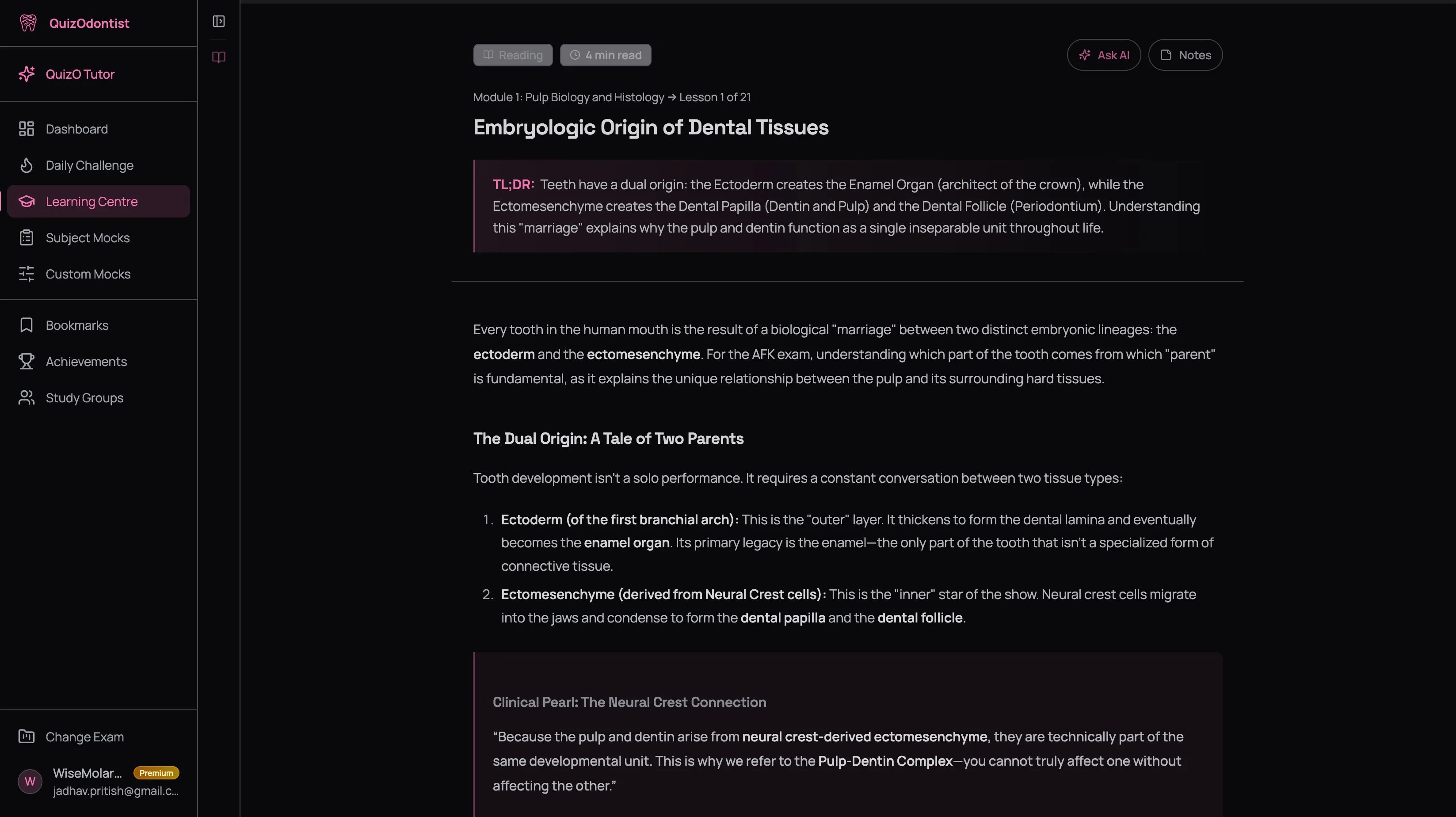
Each lesson includes:
- A TL;DR at the top — the key takeaway in two sentences, so you know what you're learning before you start
- Key terms in bold — the vocabulary the exam will test, impossible to miss
- Clinical pearls that connect the science to practice — these are the connections that stick
- Tables, mnemonics, and memory aids — drug comparisons, classification systems, recall tricks that actually work
This isn't academic prose. It's exam prep — concise, direct, built to get you from "I've seen this before" to "I know this cold."
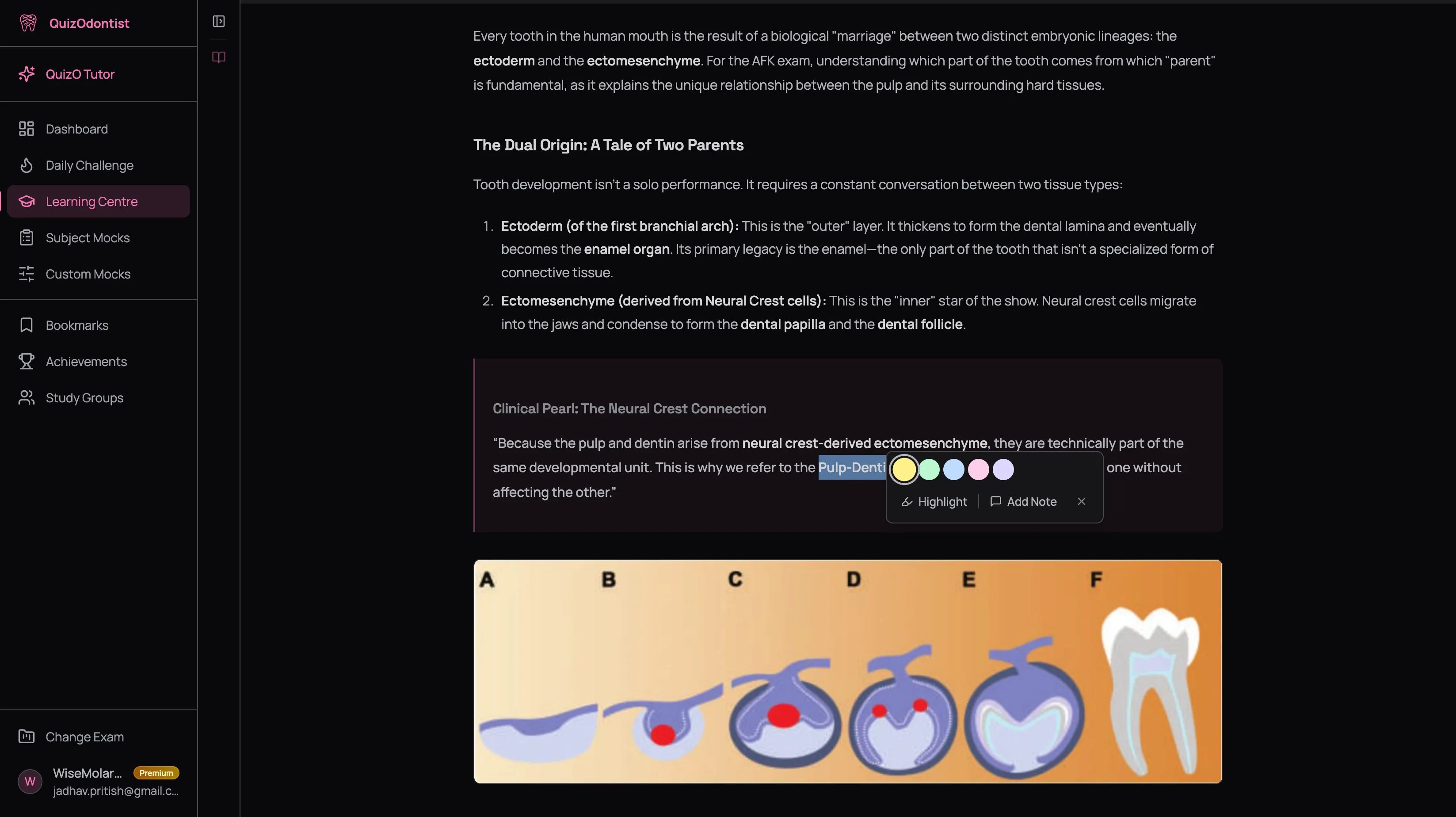
Highlighting
You're reading about local anesthetics and hit the line: "Aspirin irreversibly inhibits COX." That word — irreversibly — makes you pause. That's the moment you highlight. Not the whole paragraph. That one word, because that's the detail the exam will test and you almost glossed over it.
Highlights persist across sessions. Come back next week and they're waiting. But use them strategically:
- Highlight facts that surprised you or contradicted what you thought you knew
- Focus on definitions, mechanisms, and contraindications — the exam targets
- Don't highlight everything — if everything is highlighted, nothing is
"The maxillary artery passes through the infratemporal fossa" — if you had to pause and visualize that, highlight it. Anatomy details you can't picture are the ones you'll blank on. The things that surprise you are the things you'll get wrong if you don't flag them.
Passage Annotations
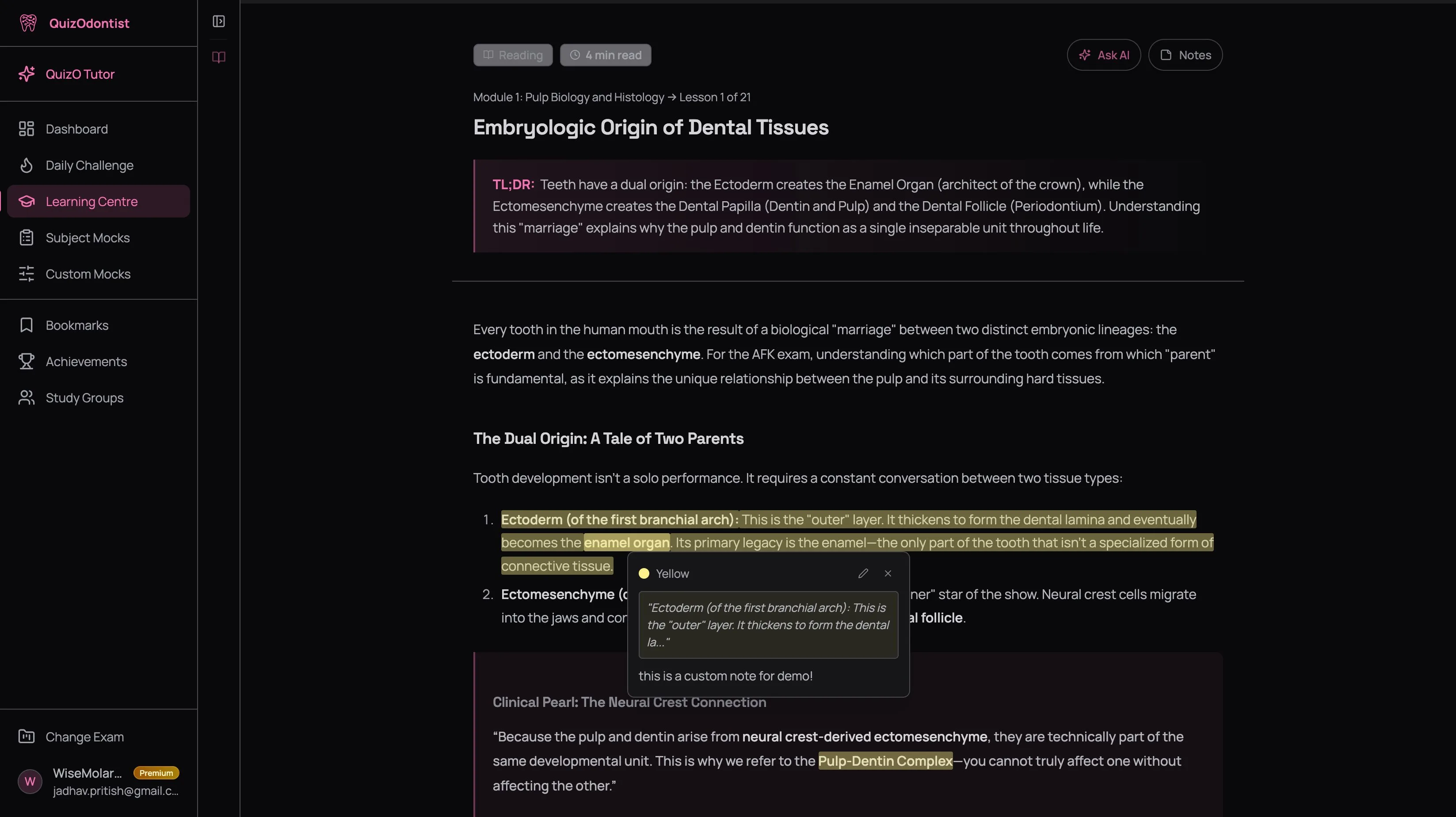
You're reading about vasoconstrictors and it clicks — this connects to the local anesthesia lesson you studied yesterday. Select the passage, click Add Note, and type: "Links to vasoconstrictor lesson — review together." Now that connection is saved exactly where you'll see it again.
Annotations go beyond highlighting. Use them to:
- Connect concepts across lessons — the links your brain makes are the ones that stick
- Add mnemonics you've created on the spot
- Flag things to ask QuizO AI — "Why does this contradict what the other lesson said?"
- Rewrite a mechanism in your own words — if you can explain it, you know it
Every annotation is private, saved to your account, and anchored to the exact passage.
The Notes Editor
Every lesson has its own notes space. Your Endodontics notes don't mix with your Oral Pathology notes. Open a lesson, your notes for that lesson are right there — no folders, no tagging systems, no hunting.
The editor supports bold, italic, lists, headings, and code blocks. Notes auto-save as you type. Use it to:
- Summarize the lesson in your own words — this forces processing, not just reading
- Create comparison tables — "How does Drug A differ from Drug B?"
- List things to review later — "Come back to the innervation of the inferior alveolar nerve"
When you revisit a lesson next week or next month, your notes are waiting exactly where you left them. No digging through a single massive document trying to find what you wrote about pulp biology. And they're completely private — no other user can see your notes, highlights, or annotations.
AI-Powered Notes
This is the feature that changes everything. The AI writes directly into the same Notes Editor described above — your manual notes and AI-generated notes live in the same space.
Click Ask AI while you're on a reading lesson and tell it: "Summarize this lesson and add the key points to my notes." QuizO AI reads the lesson content, searches its knowledgebase for additional context, and writes structured notes directly into your Notes Editor. Summaries, comparison tables, mnemonics — formatted and ready to review.
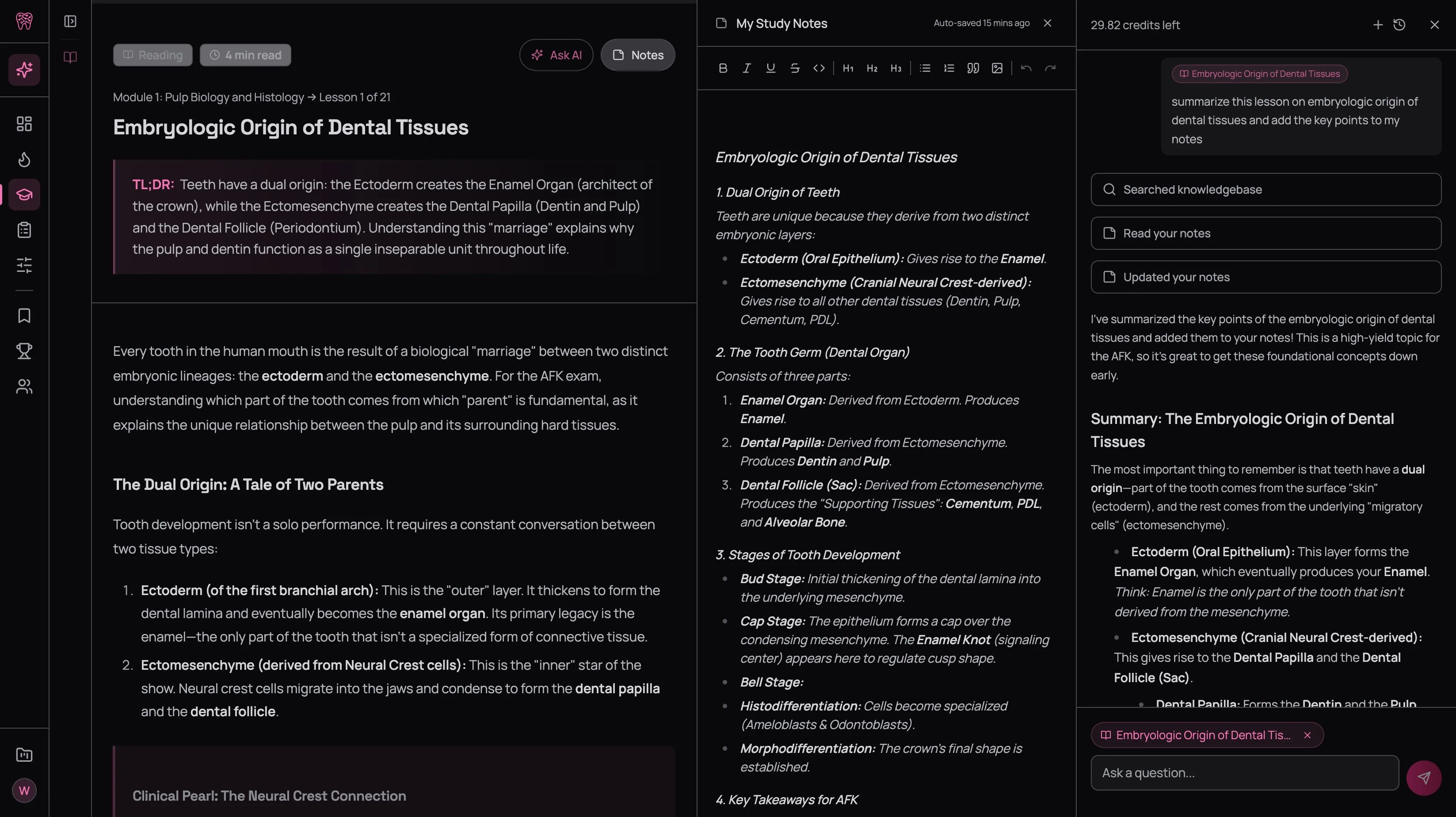
You can go further:
- "Add a table comparing these two drugs" — it builds a comparison table with mechanism, onset, duration, and contraindications, then appends it to your notes
- "Create a mnemonic for the key features" — it generates one and saves it
- "Explain this concept in simpler terms and add it to my notes" — it rewrites the explanation at your level
The AI reads your existing notes before adding, so it doesn't duplicate what's already there. Every addition is appended — it never overwrites your work. You end up with structured, exam-ready notes in seconds that would have taken you 20 minutes to write manually.
Let the AI generate the structured summary, then add your own annotations on top — the connections you made, the things that confused you, the mnemonics that clicked. The AI handles the grunt work; you add the insight. For the full deep dive on QuizO AI capabilities, see the AI Tutor tutorial.
Working Through a Lesson
Most people read passively and wonder why nothing sticks. Here's the study-smart approach that actually works:
Read the TL;DR, then skim the headings
Get the shape of the lesson before diving in. You retain more when you know the structure upfront.
Read with a quiz mindset
For every fact, ask: "How would they turn this into a question?" If the lesson says "Lidocaine has a rapid onset and intermediate duration," the exam will test which anesthetic has a rapid onset. Read with that lens.
Highlight and annotate as you go
Don't wait until the end. When a key fact registers, highlight it immediately. When a connection forms, jot an annotation. If you stop to take notes at the end, you'll forget half of what you read.
Let AI draft your notes
Open the AI tutor and ask it to summarize the lesson and add the key points to your notes. Review what it wrote. Edit or add your own observations on top.
Move to flashcards immediately
Don't close the lesson and take a break. The forgetting curve is steepest in the first 20 minutes. Go straight to flashcards while the reading is fresh.
Going Back After a Failed Quiz
You'll read a lesson, feel confident, take the pop quiz, and get 2 out of 5 wrong.
Good. That's the system working.
Go back to the reading — but this time you're not reading blind. You know exactly what you missed. The quiz exposed the gaps. Now you're reading with precision, targeting the specific facts you got wrong.
This second pass, informed by the quiz, is often where the real learning happens. The first read gives you the framework. The quiz shows you the holes. The re-read fills them. It's the same principle behind why struggling is the whole point — the discomfort of getting it wrong is the mechanism that makes it stick.
Next Up
Reading is where the information enters your brain. But reading alone doesn't make it stay — retrieval does. The moment you close the lesson and try to pull a fact from memory without looking, that's when learning actually happens.
Head to Flashcards & Pop Quizzes to learn how the active recall tools work and why the cards you get wrong matter more than the ones you get right.