You're grinding through Oral Pathology at midnight. You scored 52% on a mock and you're not sure if that's catastrophic or normal for this stage. You want to ask someone, but nobody in your life understands what the AFK even is. Your partner thinks it's "that dental thing." Your friends stopped asking how studying is going after you answered with a 10-minute monologue about virulence factors.
Study groups fix the isolation problem. They put you in a room — a digital one, but still — with people who are doing exactly what you're doing, targeting exactly the same exam, feeling exactly the same doubts.
The Study Groups Page
When you open Study Groups, you'll see two tabs and immediately start wondering why you didn't do this sooner.
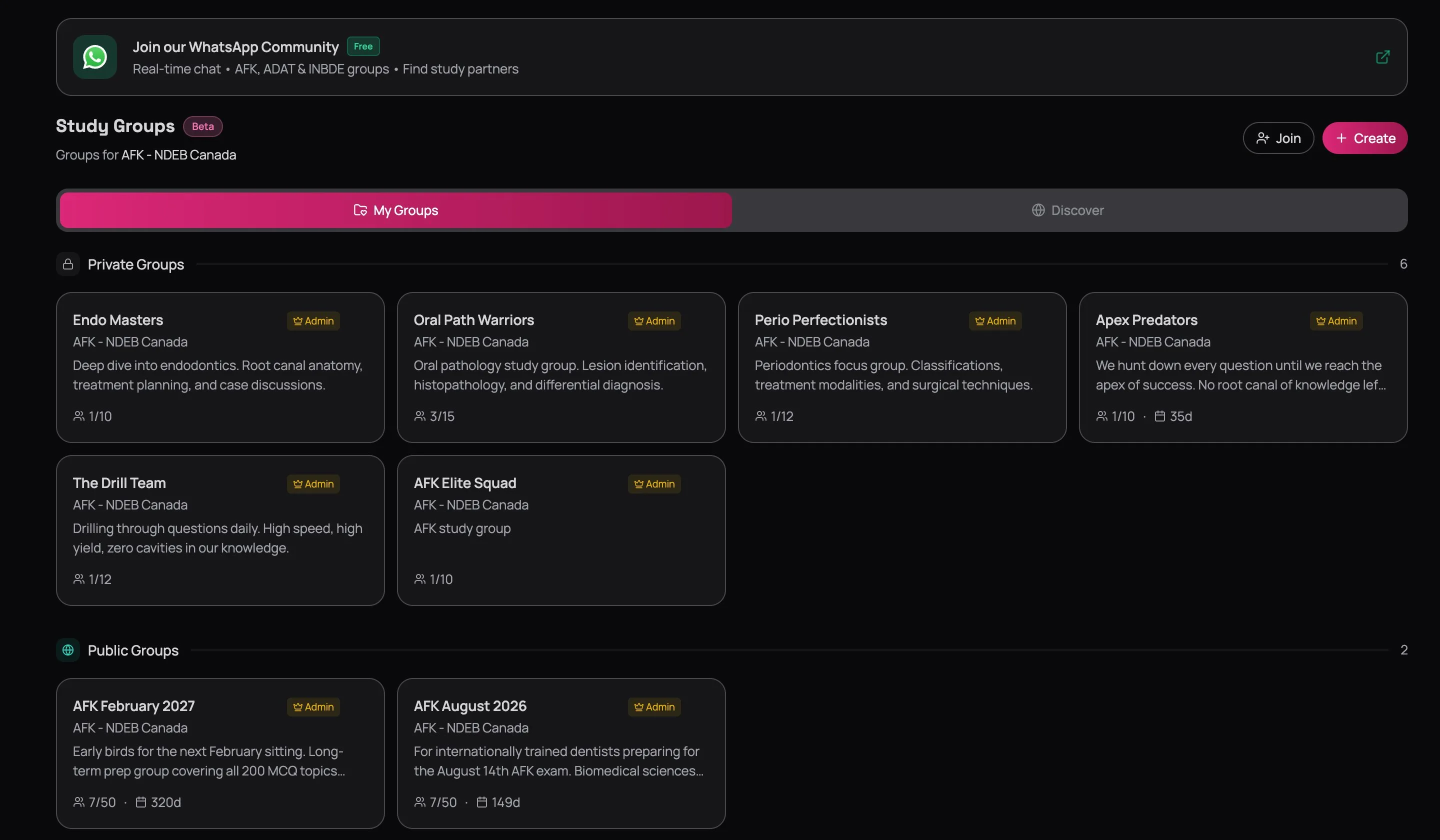
My Groups is your home base — every group you've created or joined, split into Private (invite-only, hidden from Discover) and Public (open, anyone can find them). Each card shows the exam, how full the group is, and the countdown to target date. That "149d" on the AFK August 2026 card? That's accountability staring back at you.
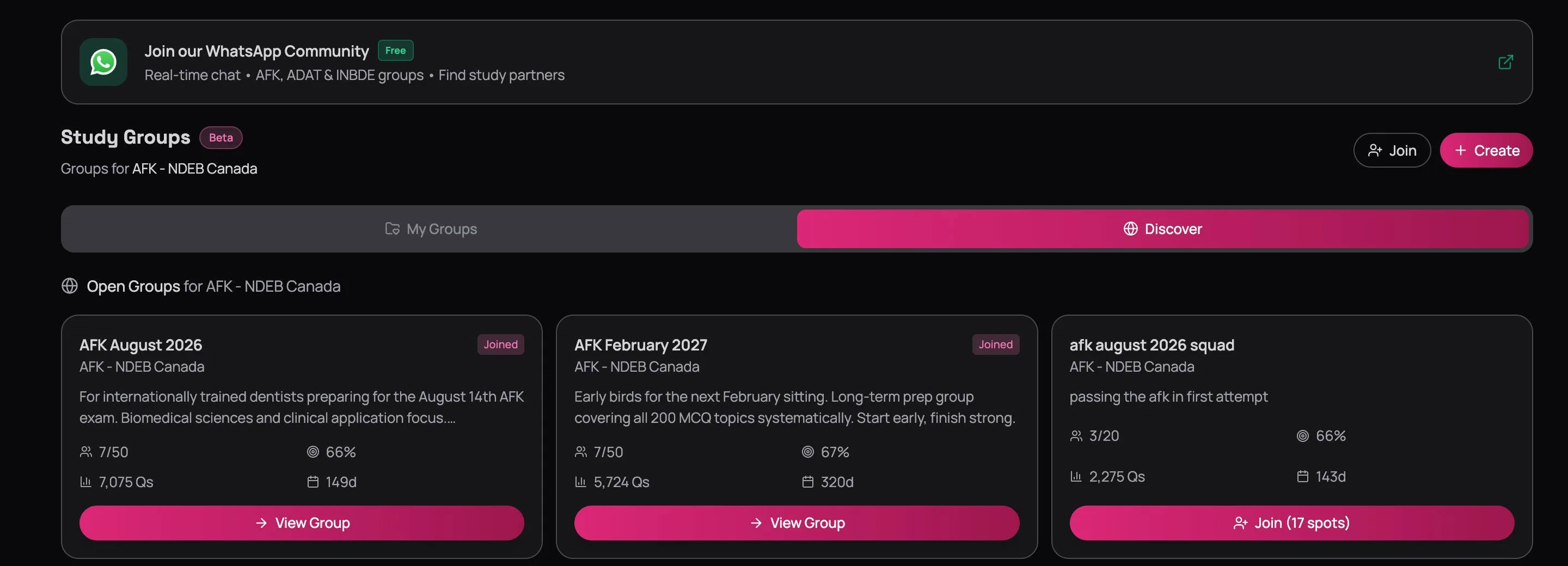
Discover is how you find new groups. It shows open groups filtered to your exam, with real stats: member count, group accuracy, total questions answered, and days until target. You can tell at a glance whether a group is active or a ghost town.
Creating a Group
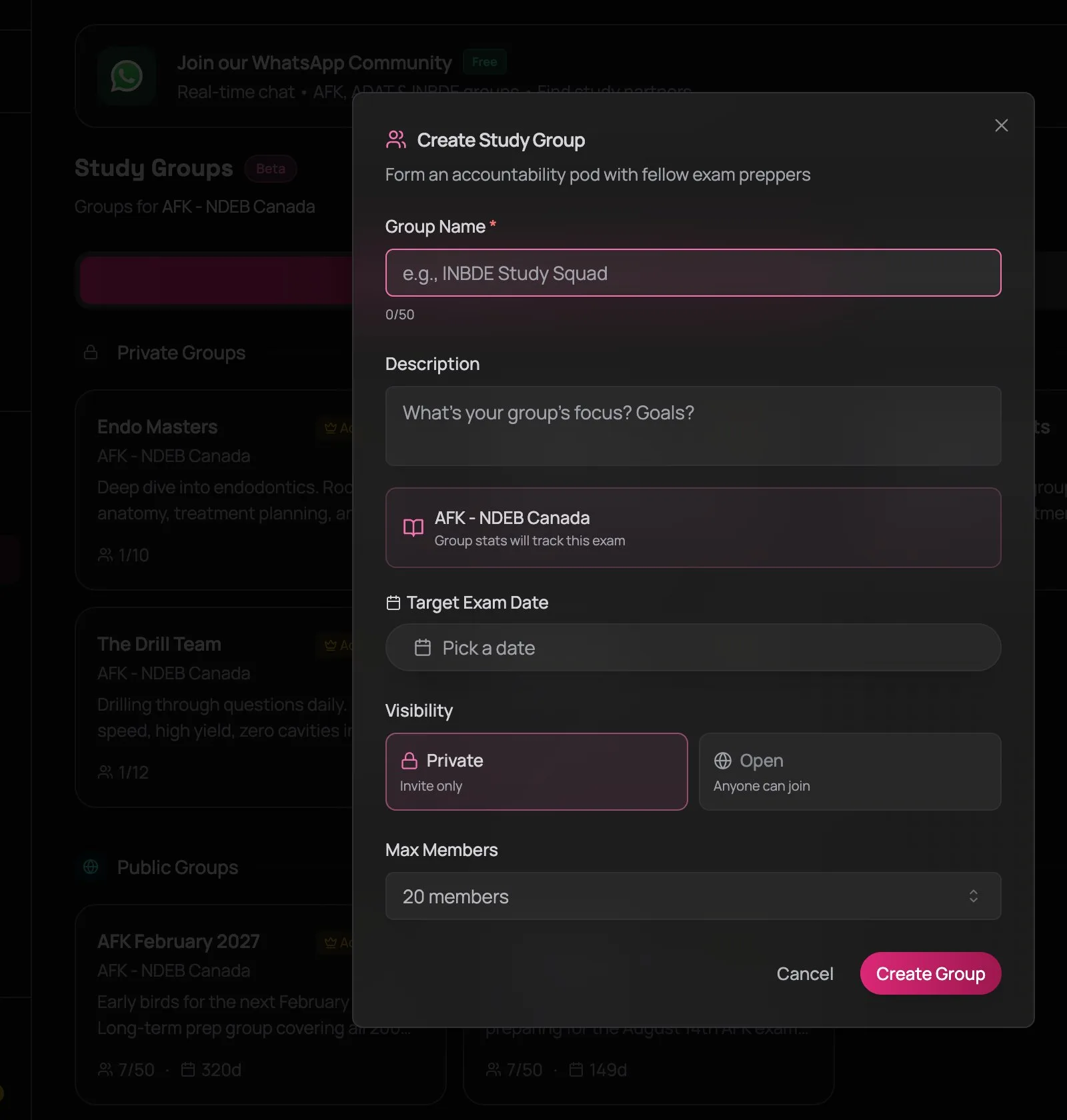
Hit the Create button in the top right and you'll get this:
Name it like you mean it
"AFK August 2026 — ITD Study Squad" tells people exactly what they're signing up for. "Study Group 1" tells them nothing. If your group is open, the description is your pitch — write it for the person scrolling through Discover at 11 PM wondering if this group is worth joining.
Pick your visibility
Two options:
- Private — hidden from Discover entirely. Only accessible via invite code. Best for classmates, study partners, or small accountability pods where you already know who's in.
- Open — anyone can find it in Discover and join instantly. Best for building a larger community around an exam sitting.
If you're forming a group with four classmates, go Private and share the code. If you want to meet other candidates sitting the same exam, go Open.
Set a target exam date
This date shows on the group dashboard as a countdown. When it says "35 days," the energy changes. Everyone can feel the deadline. Groups without a target date drift — set one.
Set a member limit
Small groups (4–8 people) are more personal and accountable — you notice when someone goes quiet. Larger groups (15–50) have more leaderboard competition and a bigger data pool. Pick based on what you want: tight accountability or broad competition.
Joining a Group
Two ways in:
- Browse Discover — find an open group that matches your exam and timeline. Check the stats — group accuracy and question count tell you whether it's active or dead. Click Join.
- Enter an invite code — hit the Join button at the top of the page and paste the code. This is the only way into private groups. Someone in the group can share their code from the group dashboard.
Every group gets a unique invite code. Share it in your class WhatsApp, your dental student forum, or with the three friends who are also pretending they started studying weeks ago. The code is the fastest way to get the right people in.
Private vs. Open — Which to Choose
This depends on what you need:
Private groups work best when you already know your people. Four classmates, a study buddy from dental school, your roommate who's also sitting the AFK. The accountability is personal — you're not just a name on a leaderboard, you're the person who has to face these people in clinic tomorrow. That pressure is useful.
Open groups work best when you want a larger sample size. More members means the group accuracy and heatmap data are more meaningful. You can see how your performance compares against 20 or 30 other candidates, not just three. The leaderboard gets competitive. The challenges get interesting.
Most serious students end up in both — a small private group for tight accountability and a larger open group for broader competition and data.
WhatsApp Community
Study groups handle the data side — leaderboards, challenges, progress tracking. But sometimes you just need someone to tell you that yes, getting 45% on your first Pharmacology mock is normal and no, you're not going to fail.
QuizOdontist maintains a WhatsApp Community for dental students preparing for AFK, INBDE, and ADAT. Look for the banner at the top of the Study Groups page.
The distinction: study groups track your data and progress. WhatsApp is for conversation, resource sharing, and the kind of moral support that comes from someone else saying "yeah, Pharmacology is killing me too." Use both.
Next Up
Creating or joining a group is step one. The real value is in what happens inside — the Knowledge Map that shows where your group is strong and weak, the leaderboard that makes consistency competitive, and the challenges that turn studying into a shared event.
Head to Inside Your Study Group for the full walkthrough of everything that happens once you're in.